Solar Monkey FAQ
What is Solar Monkey used for?
Solar Monkey is a software tool that estimates the solar yield of panels in a specific setup. It takes into account the orientation, location, and possible shading of the panels. With the built-in battery feature, you can also calculate how a battery affects a household’s energy profile. This helps determine the most efficient configuration of panels, batteries, and inverters for any site.
How do I use Solar Monkey?
Step 1: Create a site and mark the roof
- Start by creating a new site.
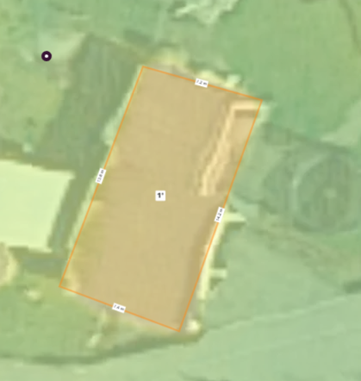
- Enter the address and mark the roof area where panels could be installed.
- Solar Monkey will automatically estimate the roof’s slope. Use the “markeer het dak” tool to select the corners of the roof.
- Keep in mind: Solar Monkey is less precise than official technical drawings. Always ask the client for the exact roof slope when possible.
Step 2: Mark shadow areas
Shading can be added manually or automatically. For manual shading, there are six preset categories (0–30%). Choose the one that best matches the situation:
- 0% – No shadow, fully unobstructed
- 2% – Small obstacle on a flat or sloped roof
- 4% – Obstacles nearby of equal or greater height
- 8% – Tall trees or buildings ~20m away
- 16% – Roof sections partially shaded by other parts of the house
- 30% – Under a tree, shaded most of the day
Step 3: Create the panel layout
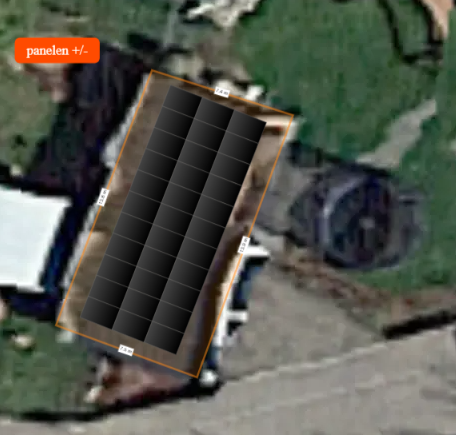
- Select ‘panelen’ and enter details: panel orientation, slope, spacing, and panel type.
- Click ‘Nieuw veld met deze instellingen’ and draw the layout (similar to the Taylor Installer app).
- If orientation is unclear, adjust it directly in the layout using the rotate button. Align with the satellite image, but note that satellite images can appear skewed and are not perfectly vertical.
Step 4: Calculate solar energy generation
Click ‘bereken’ to generate the results. Solar Monkey will provide:
- Estimated yearly yield (kWh)
- Total installed peak power (Wp) based on panel type and number

Step 5: Add consumption data
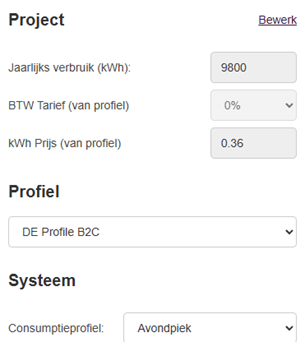
To calculate the optimal battery size, you first need the user’s annual consumption.
- A typical household without an EV or heat pump uses ~5,000 kWh/year.
- Go to Finance → Project → bewerk and enter this data.
- Under Profiel, select DE Profile B2C.
- Under Systeem, select Avondpiek unless the client specifies otherwise.
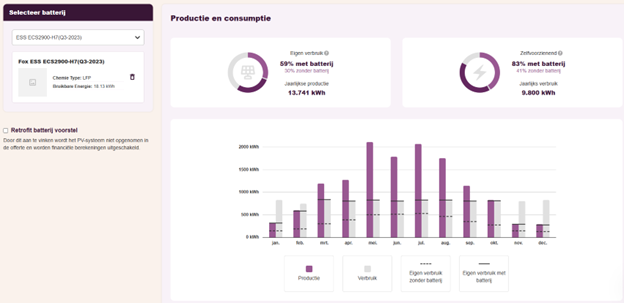
Once saved, check the battery tab. If values appear for Eigen verbruik zonder batterij and Zelfvoorzienend zonder batterij, you’ve set it up correctly.
Step 6: Add a battery
In the battery overview:
- Select a battery type.
- Record the results in the Excel sheet: Accu capaciteit en matching omvormer.xlsx
Step 7: Choose the most suitable battery
Use the Excel sheet to compare results. Look at the change in Eigenverbruik and Zelfvoorzienend:
- As battery size increases, improvements eventually slow down.
- The optimal choice is at the “sweet spot,” where benefits are still increasing but not yet flattening.
- For guidance, check examples in the Excel overview.
Step 8: Select the inverter and finalize the data
- Match the chosen battery with the correct inverter for the site’s panel setup (adjust in PV settings).
- Record both the production and battery data.
- The sales team may ask you to fill in a PowerPoint template with the Solar Monkey results. Always request their latest version and confirm the required format.
- Save and close the project.