Gateway RJ11 connector.
On one side, the cable is connected to the gateway using an RJ11 connector; on the other side, it is connected to the inverter. The cable can be ordered, and assembled by the installer. Please make sure that the RJ11 connector pinout matches the diagram shown below. Please follow the instructions below.
RJ11 cable (TAYLOR-GTW-C-03) 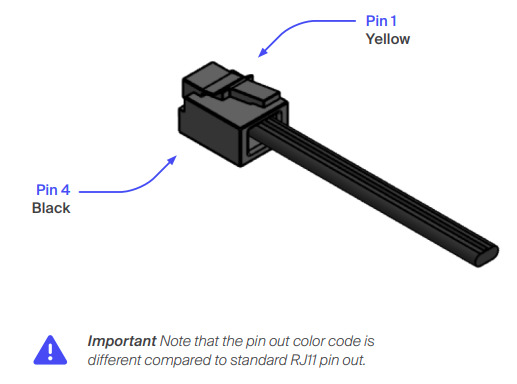
| RJ11 PIN | Taylor | |
| 1 | Yellow | N\A |
| 2 | Green | 485- |
| 3 | Red | 485+ |
| 4 | Black | GND |
FOX H1 Communication Cable Setup
Required Materials:
- RJ11 cable (TAYLOR-GTW-C-03)
- Inverter communication connector (included in the packing list of the Fox H1 Inverter)
Installation Steps:
-
Connect the green wire from the RJ11 cable to Pin 4 of the inverter’s communication connector.
-
Connect the red wire from the RJ11 cable to Pin 3 of the inverter’s communication connector.
- For installations with CT clamp: Connect the CT clamp to the same inverter communication connector.
-
Use the 2-pole cable to connect CT+ of CT clamp to Pins 8 of the inverter connector.
- Use the 2-pole cable to connect CT- of CT clamp to Pins 7 of the inverter connector.
-
-
For installation with Energy meter: Connect the energy meter to the same inverter communication connector.
-
Use the 2-pole cable to connect Pin 24 of the energy meter to Pins 1 of the inverter connector.
-
Use the 2-pole cable to connect Pin 25 of the energy meter to Pins 2 of the inverter connector.
- Configure inverter to 3phase energy meter (Menu -> Feature -> Meter\CT -> 3p meter.
-
- Plug the RJ11 connector into the Gateway (GW).
-
Connect the inverter communication connector to the inverter’s METER/RS485 port, following the inverter installation guide.
| RJ11 PIN (Taylor) | H1 Connector | |
| 1: N\A | Yellow | |
| 2: 485- | Green | Pin 4\RS485A |
| 3: 485+ | Red | Pin 3\RS485B |
| 4: GND | Black |
H1 Connector 8 pin connector 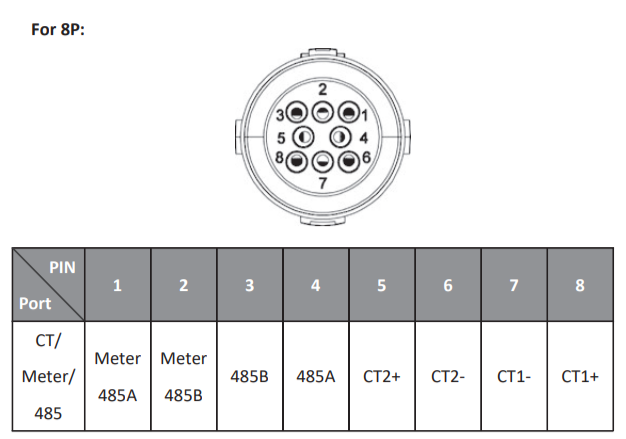
FOX H3 Communication Cable Setup
Required Materials:
- RJ11 cable (TAYLOR-GTW-C-03)
- 2-pole cable
-
Inverter communication connector (included in the packing list of the Fox H3 Inverter)
Installation Steps:
-
Connect the green wire from the RJ11 cable to Pins 1 of the inverter’s communication connector.
-
Connect the red wire from the RJ11 cable to Pins 2 of the inverter’s communication connector.
-
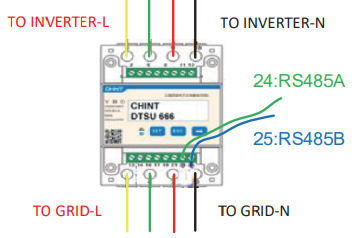
Connect the energy meter to the same inverter communication connector.
-
Use the 2-pole cable to connect Pin 24 of the energy meter to Pins 4 of the inverter connector.
-
Use the 2-pole cable to connect Pin 25 of the energy meter to Pins 3 of the inverter connector.
-
- Plug the RJ11 connector into the Gateway (GW).
- Plug the inverter communication connector into the inverter's METER/RS485 port, following the inverter installation guide.
| RJ11 PIN (Taylor) | H3 Connector | |
| 1: N\A | Yellow | |
| 2: 485- | Green | Pin 2 |
| 3: 485+ | Red | Pin 1 |
| 4: GND | Black |

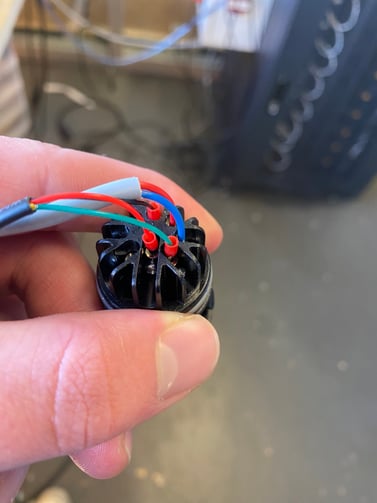
H3 Connector 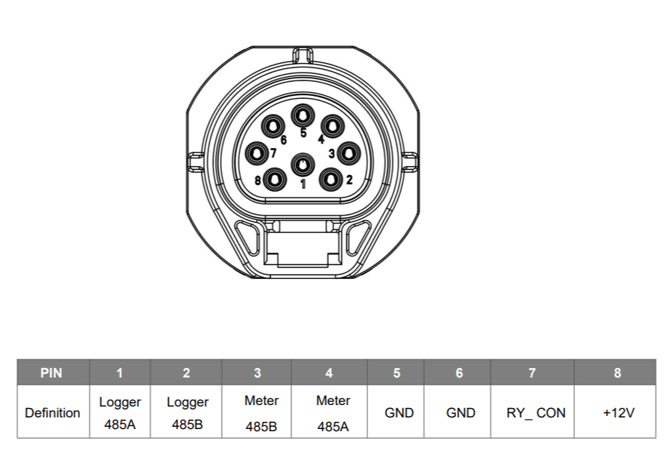
Energy meter
FOX H3 Pro Communication Cable Setup
Required Materials:
- RJ11 cable (TAYLOR-GTW-C-03)
- 2-pole cable
-
Inverter communication connector (included in the packing list of the Fox H3 Pro Inverter)
Installation Steps:
-
Connect the green wire from the RJ11 cable to Pins 18 of the inverter’s communication connector.
-
Connect the red wire from the RJ11 cable to Pins 17 of the inverter’s communication connector.
-
Connect the energy meter to the same inverter communication connector.
-
Use the 2-pole cable to connect Pin 24 of the energy meter to Pins 7 of the inverter connector.
-
Use the 2-pole cable to connect Pin 25 of the energy meter to Pins 8 of the inverter connector.
-
- Plug the RJ11 connector into the Gateway (GW).
- Plug the inverter communication connector into the inverter's METER/RS485 port, following the inverter installation guide.
| RJ11 PIN (Taylor) | H3 PRO Connector | |
| 1: N\A | Yellow | |
| 2: 485- | Green | Pin 18\RS485B |
| 3: 485+ | Red | Pin 17\RS485A |
| 4: GND | Black |
H3 PRO Connector 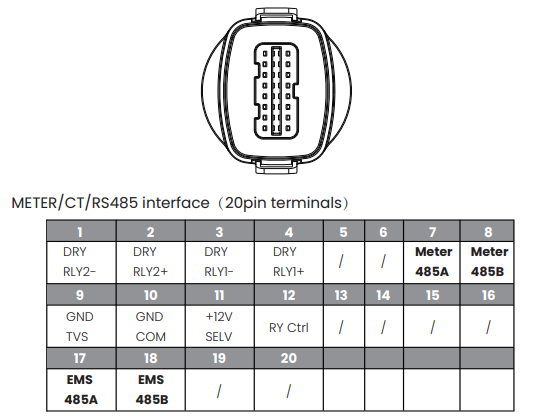
Energy meter